


In this article:
- Short Answer: Should You Use Invoice Simple?
- What Is Invoice Simple?
- My Real-World Test: Building and Sending an Actual Invoice
- What People Are Actually Saying: Trustpilot and User Reviews
- Templates and Customization
- Getting Paid: Where Invoice Simple Really Shines
- Estimates That Convert in One Click
- Expense and Receipt Tracking
- Reporting: Useful, But Basic
- The Mobile App
- Common Issues and How to Fix Them
- Tips for Getting the Most Out of Invoice Simple
- Pricing: What You'll Actually Pay
- What I Liked
- What Could Be Better
- How Invoice Simple Compares
- Who Should Use Invoice Simple
- Who Might Want to Look Elsewhere
- FAQ
- Final Verdict
If you’ve ever opened some big-brand software just to send a single $200 invoice to a client, you know the feeling. You’re greeted with dashboards, reports, a chart of accounts, and about ten features you’ll never touch—just to do something that should take thirty seconds.
Which seems to be the #1 reason Invoice Simple was created.
Invoice Simple strips invoicing down to what most freelancers and small business owners actually need: a clean, professional-looking invoice, a fast way to send it, and an easy way to get paid. No accounting degree required, no client portal to configure, no bloated dashboard standing between you and getting paid.
I spent time testing Invoice Simple across desktop and mobile, comparing it against the full-service alternatives, digging through hundreds of Trustpilot reviews, and talking to other freelancers who use it day to day. Here’s my honest take on whether it’s the right invoicing tool for your business.
Short Answer: Should You Use Invoice Simple?
Don’t have time for the full review? Here’s my quick take:
YES: If you’re a solo freelancer or small business owner who sends a modest number of invoices each month and wants something fast, mobile-friendly, and genuinely simple. Especially great for service providers—photographers, contractors, consultants, designers—who need to look professional without managing a full accounting system.
PROBABLY NOT: If you’re sending a high volume of invoices monthly, need deep financial reporting or tax tools, or want a true free tier with unlimited invoicing. Businesses that need robust bookkeeping alongside invoicing will outgrow this quickly.
You Deserve Better Clients...
We can help you find them. Just send us the details and we'll hunt down leads that match your business needs. All on autopilot.
What Is Invoice Simple?
Brand Invoice Simple not found.
My Real-World Test: Building and Sending an Actual Invoice
Rather than just click through the feature list, I wanted to see what a real invoice-to-payment cycle actually feels like. So I set up an account, added a fictional client, and billed for a small consulting project.
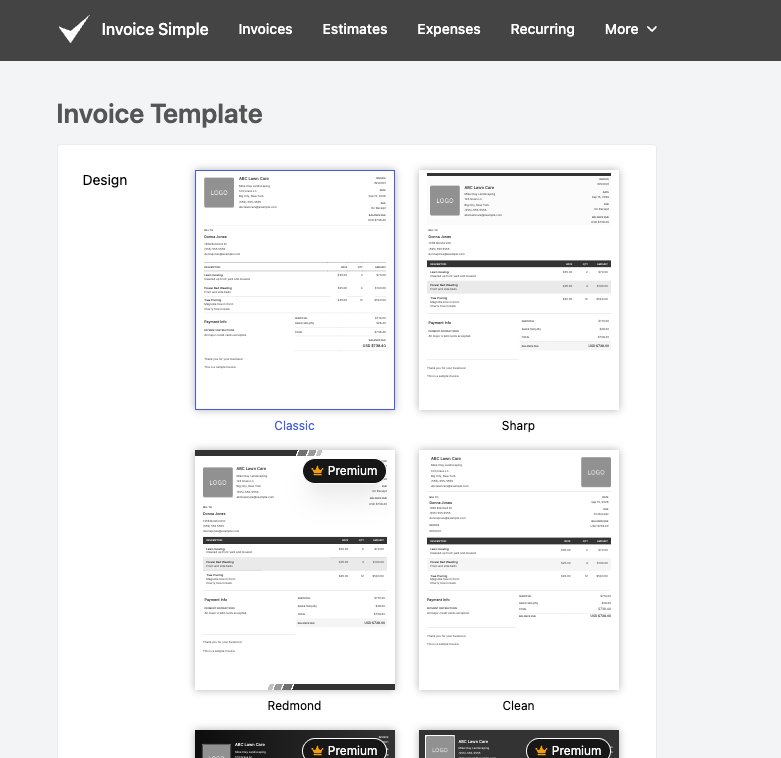
Setup (about 5 minutes): I uploaded my logo, set my default tax rate and currency, and picked a template from the consulting category. The template selection is genuinely well-organized by industry, so I wasn’t scrolling through irrelevant options built for, say, auto repair shops.
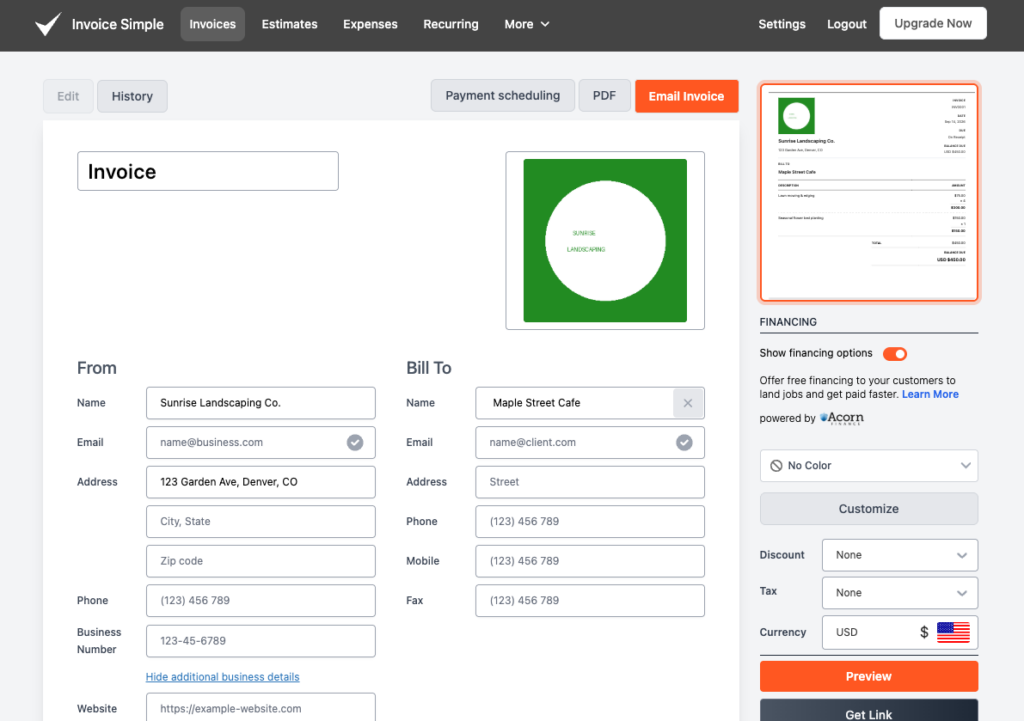
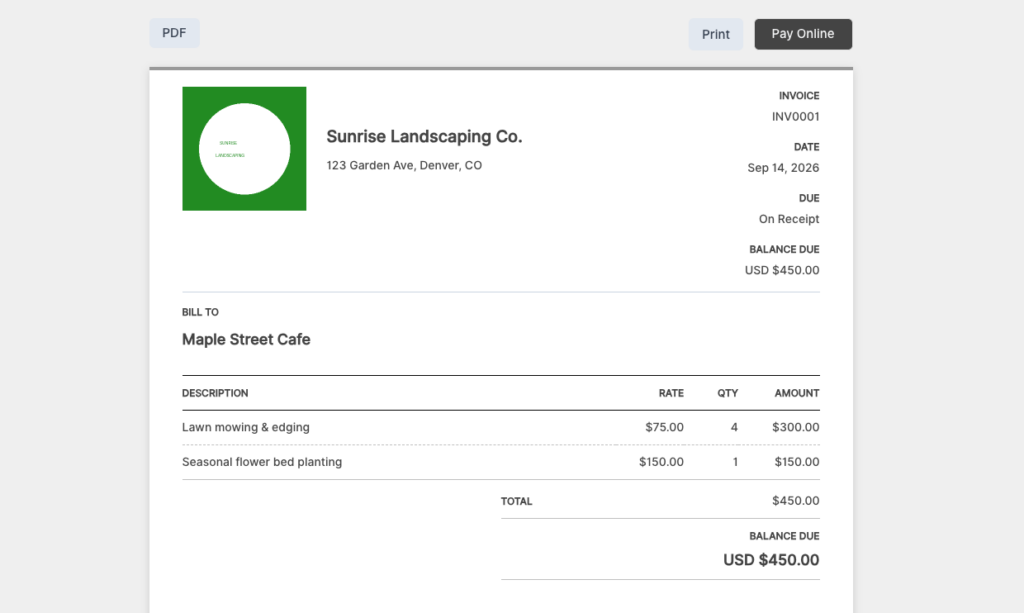
Creating the invoice (under 2 minutes): I typed in the client’s name and Invoice Simple offered to save it for next time. I added two line items—a flat project fee and an hourly add-on—and the app calculated the tax and total automatically. I attached a short note and set a due date 14 days out.
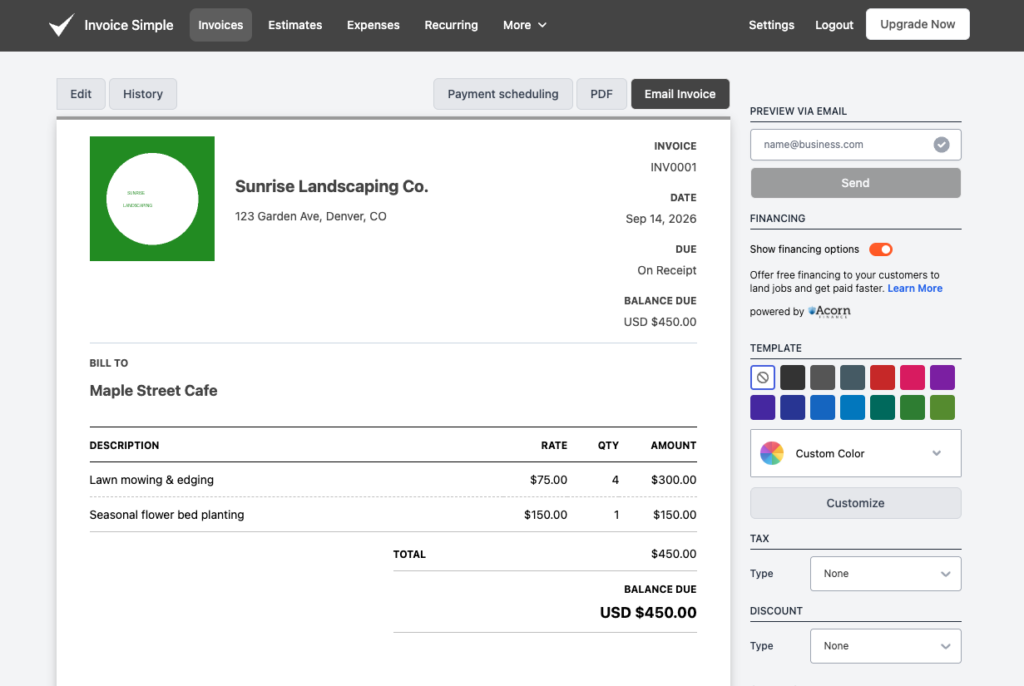
Sending it: I had the option to send via email, text, or a shareable link. I went with email, and the client-facing version looked polished—clean layout, my logo front and center, a clear “Pay Now” button.
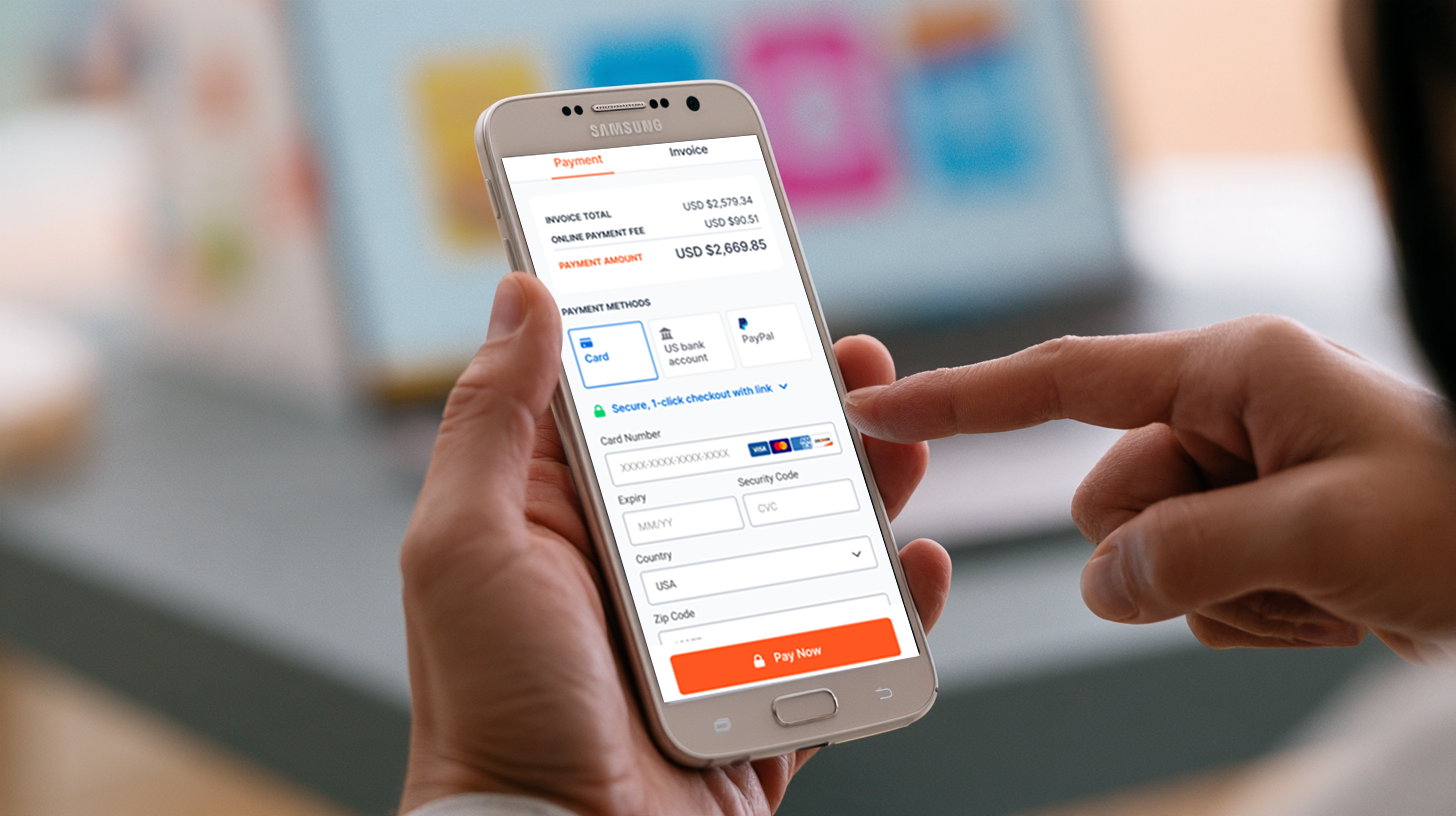
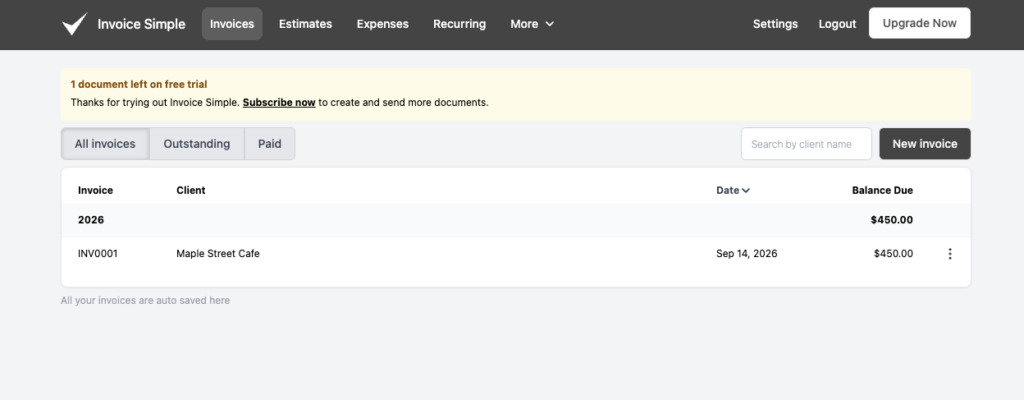
Getting paid: I tested the payment flow from the client’s side. The invoice loaded quickly, offered several payment options (I used a test card), and processed in a few seconds. Back on my end, the invoice status flipped from “Sent” to “Paid” automatically, with no manual step required on my part.
Converting an estimate: I also tested the estimate-to-invoice flow by building a quick estimate for a hypothetical second project, then converting it to an invoice once “approved.” Every detail—line items, client info, notes—carried over cleanly. This is genuinely one of the most frictionless parts of the app.
Total time from opening the app to having a paid, professional-looking invoice: about 10 minutes, most of which was one-time setup. On a second and third invoice to the same client, the whole process took closer to 90 seconds thanks to the saved client and item data.
What People Are Actually Saying: Trustpilot and User Reviews
I dug through a large sample of Trustpilot reviews (Invoice Simple currently holds a solid 4-star rating there) to see how real, long-term users feel—not just what the marketing page says.
What people consistently praise:
The most frequent theme, by far, is that the app is genuinely easy to use. Reviewers repeatedly describe the interface as intuitive and say it makes invoicing, tracking, and even basic tax prep noticeably simpler. Many long-time users—some who’ve been on the platform since 2019—say they’ve grown more confident running their business because of how straightforward the tool is.
Customer support also comes up constantly, and almost always positively. Multiple reviewers specifically called out fast response times and helpful, human agents who resolved their issues rather than routing them through a bot loop. This was a pleasant surprise, since email/chatbot-only support can sometimes mean long waits—based on the review pattern, that doesn’t seem to be the common experience here.
What people consistently complain about:
The most recurring frustration is pricing. A meaningful number of reviewers—including several long-term customers—say the app started off affordable and has become noticeably more expensive over time, sometimes without much advance notice. A few mentioned that invoice allowances shrank or plan features changed in ways that caught them off guard.
There are also scattered reports of billing hiccups (like being charged for both a monthly and annual plan on the same day) and the occasional bug—one user described old invoice wording incorrectly carrying over to new invoices, which caused a client to dispute payment. To Invoice Simple’s credit, their support team responded directly and personally to that complaint on Trustpilot, offering to fix it and cover the miscommunication.
My read on this: The pattern in the reviews lines up with what I found in my own testing. The product itself is well-liked and does what it promises. The friction shows up around billing and pricing changes, not around the core invoicing experience. If you go in with clear eyes about pricing potentially shifting over time and keep an eye on your renewal terms, you’re likely to have the same positive experience most reviewers report.
Templates and Customization
Invoice Simple offers more than 60 templates, many of which are industry-specific—think rental invoices, freelancer invoices, construction invoices, photography invoices, graphic design invoices, and contractor invoices. You can adjust colors, add your logo, include a digital signature, and tweak line-item details like discounts, shipping, and tax settings.
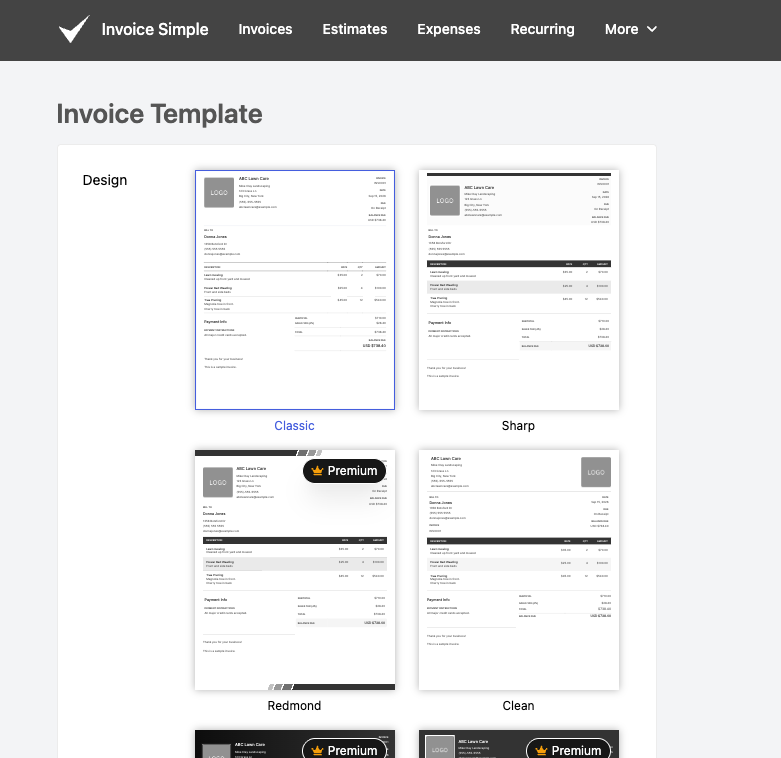
It’s a small thing, but having an invoice that actually looks tailored to your industry—rather than a generic template—goes a long way toward looking established, especially if you’re still building out your client base.
Getting Paid: Where Invoice Simple Really Shines
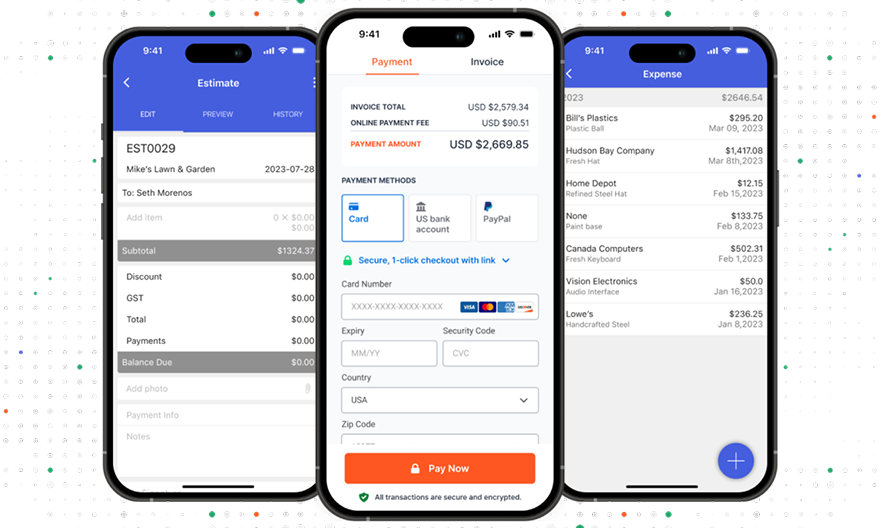
This is arguably the strongest part of the product. Clients can pay directly from the invoice using whatever method is easiest for them: credit or debit card, PayPal, Venmo, ACH bank transfer, Apple Pay, or Google Pay, depending on your region. Payments are processed securely, and once a client pays, the invoice status updates automatically—no manual tracking required.
You can also turn on automated payment reminders and set up recurring invoices for retainer clients or subscription-based work, which means “set it and forget it” billing without you having to remember to follow up on a late payment.
Estimates That Convert in One Click
If your work involves quoting a job before you invoice for it, Invoice Simple’s estimate feature is genuinely useful, as I found in my own test above. You build and send an estimate the same way you’d build an invoice, and once your client approves it, you convert it into a full invoice with a single tap—all the details carry over automatically. If you bill hourly, you can input time and rates directly into that estimate-to-invoice flow.
Expense and Receipt Tracking
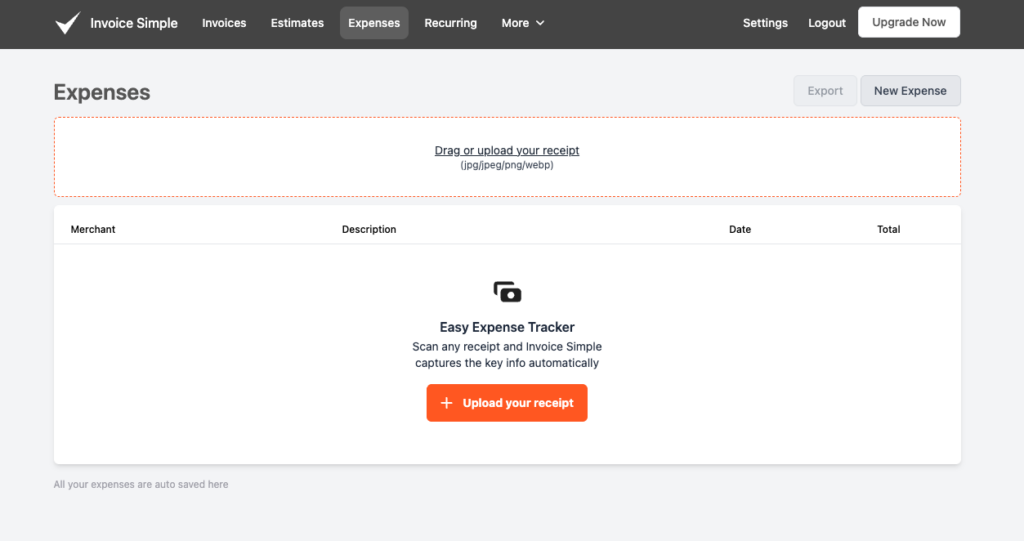
Invoice Simple includes a basic business expense tracker that lets you snap a photo of a receipt and have key details—date, amount, vendor—captured automatically. It’s not going to replace a dedicated bookkeeping tool, but for freelancers who just need a simple way to keep receipts organized for tax season, it removes a genuinely annoying manual task.
Reporting: Useful, But Basic
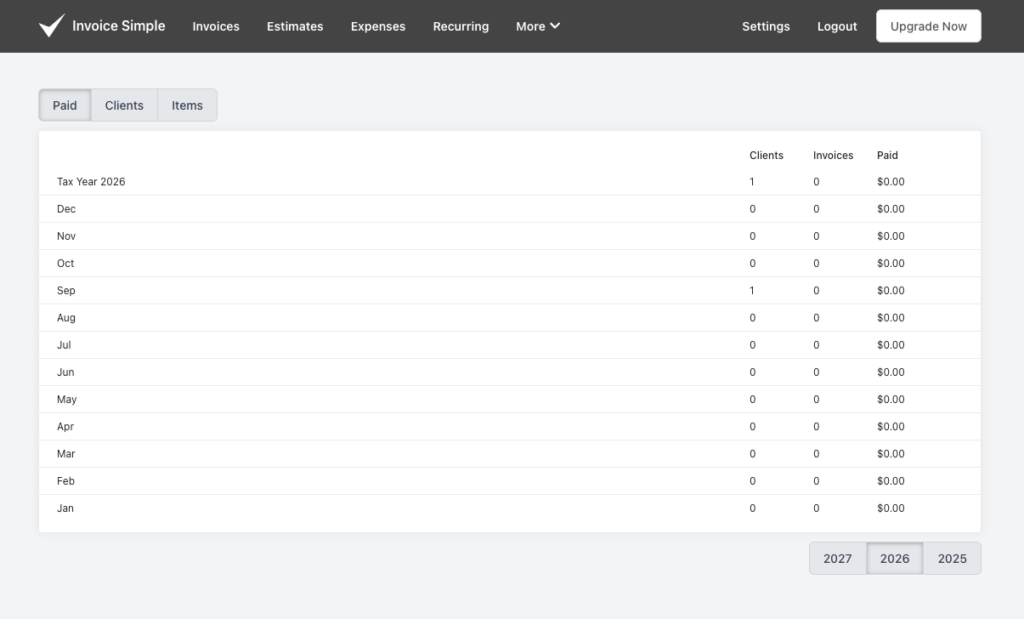
You get a simple reporting tab that shows income and outstanding invoices, which is enough to get a general pulse on your business. But if you’re looking for the kind of deep financial reporting, tax summaries, or expense categorization you’d get from QuickBooks or Xero, you won’t find it here. That’s a deliberate tradeoff—Invoice Simple stays in its lane as an invoicing tool rather than trying to be a full accounting platform.
The Mobile App
The mobile app mirrors the full functionality of the desktop version, which is worth calling out because a lot of “mobile-friendly” apps quietly strip out features on the smaller screen. Here, you can create and send invoices and estimates, track payment status, scan receipts, and manage clients entirely from your phone. For photographers, contractors, or anyone who wraps up a job on-site and wants to invoice before they’ve even left, this is a genuinely practical feature—not just a nice-to-have.
Common Issues and How to Fix Them
Between my own testing and patterns in user reviews, a few recurring issues stood out. Here’s what to watch for and how to handle them:
Issue: Being charged for both a monthly and annual plan on the same day. Some users reported accidentally getting billed twice when switching plans mid-cycle. If you’re upgrading or switching billing frequency, double-check your account’s billing section immediately after the change, and screenshot your plan confirmation. If you do get double-charged, Invoice Simple’s support team has generally responded quickly to resolve billing errors when contacted directly.
Issue: Old invoice wording or details carrying over incorrectly to new invoices. A small number of users encountered a bug where outdated line-item wording persisted on new invoices, in one case causing a client to dispute payment. If something on a sent invoice looks off, don’t just resend it—open a fresh invoice, manually re-verify every field, and clear your saved template defaults if the issue persists.
Issue: Changing currency for one client changes it account-wide. This is a known quirk: adjusting the currency setting isn’t always scoped to a single client or invoice, and can shift your default currency for all future transactions. If you work with international clients, set the currency manually on each invoice at the time of sending rather than relying on saved defaults.
Issue: Hitting your invoice cap mid-month. If you’re on Essentials or Plus and you unexpectedly run out of invoices for the month, you can either upgrade to a higher tier for the remainder of the cycle, or hold non-urgent invoices until your limit resets. Keep a general sense of your monthly invoice volume so this doesn’t catch you off guard right before a client deadline.
Issue: Price or feature changes on renewal. Several long-term users reported being surprised by price increases or plan restructuring at renewal time. Set a calendar reminder a week before your renewal date, and check the current pricing and plan details directly in your account settings rather than assuming last year’s terms still apply.
Tips for Getting the Most Out of Invoice Simple
Do your one-time setup properly before your first real invoice. Upload your logo, set your default tax rate and currency, and pick a template that fits your industry. This upfront investment is what makes every invoice after the first one take under two minutes.
Save clients and line items as you go. The autofill feature only gets useful once you’ve entered information at least once. If you know you’ll be billing a client repeatedly, enter their full details carefully the first time.
Use estimates for any project with real scope. Converting an approved estimate into an invoice takes one click and eliminates the scope-creep confusion that comes from verbally agreeing on a price and invoicing from memory later.
Decide upfront who eats the payment processing fee. If your margins are thin, use the option to pass PayPal’s processing fee on to the client rather than absorbing it yourself on every transaction.
Set calendar reminders around your billing cycle. Given the recurring theme of pricing and plan changes at renewal, don’t wait for a surprise charge—check your plan and pricing a week before renewal each cycle.
Pair it with a separate bookkeeping tool if you need real financial reporting. Invoice Simple’s reporting tab is fine for a quick income snapshot, but if you need tax-ready reports, plan to export your data into dedicated accounting software or hand it to a bookkeeper.
Test the payment flow from your client’s perspective at least once. Send yourself a test invoice and pay it the way a client would. It’s the best way to catch formatting issues or confusing steps before a real client ever sees them.
Pricing: What You’ll Actually Pay
Invoice Simple isn’t free for regular use, though there is a free tier to test the waters.
Free: Send a small number of invoices, estimates, and receipts per month—enough to try the interface and template quality, but not enough for consistent client billing.
Essentials — around $6.99/month (or ~$69.99/year): A modest monthly invoice allowance, autofill for clients and items, real-time read receipts, and full mobile app access.
Plus — around $13.49/month (or ~$134.99/year): A higher invoice allowance, the ability to attach photos, add a business signature, generate summary reports, and turn on automatic due-date reminders. For many freelancers juggling a handful of active clients, this tier tends to be the sweet spot.
Premium — around $19.99/month (or ~$199.99/year): Unlimited invoicing, deposit requests, client signatures, premium templates, and the ability to restore older invoices.
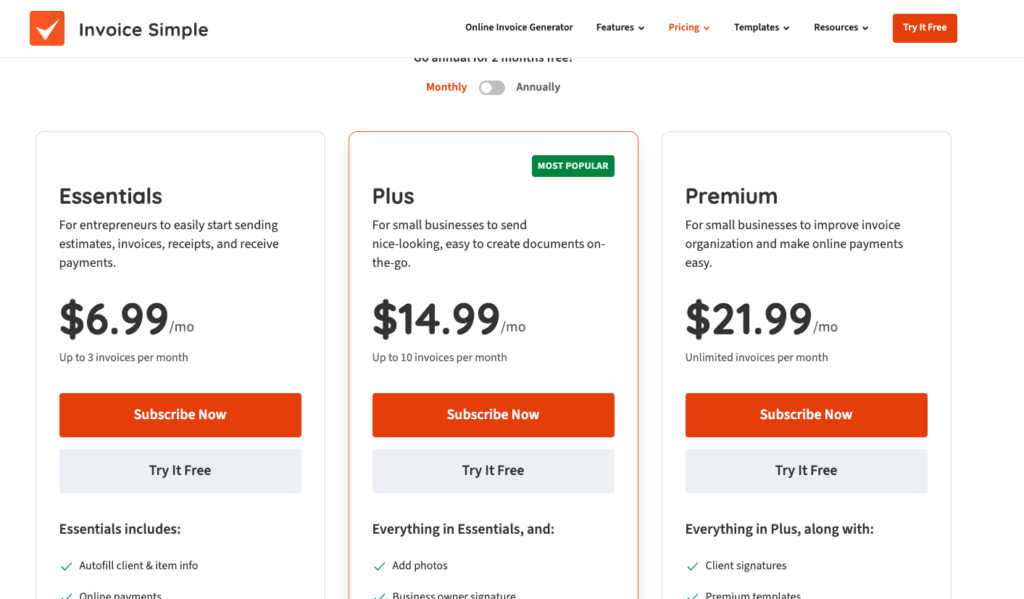
Annual billing knocks a couple months’ cost off each tier if you know you’re sticking with it.
One fee to be aware of: payments processed through Invoice Simple’s PayPal integration carry PayPal’s standard processing fees (a percentage plus a flat fee per transaction), which run a bit higher than some competitors. If that’s eating into thin margins, Invoice Simple does let you pass those processing fees on to the client instead of absorbing them yourself.
A quick word on pricing changes: As reflected in the Trustpilot review patterns above, pricing has shifted over time, and some long-term users have flagged frustration with increases and with invoice caps that feel tight once you’re invoicing regularly. Before committing to an annual plan, it’s worth checking the current pricing page directly and reading the terms around plan changes, just so there are no surprises at renewal.
What I Liked
The speed is real. Once your account is set up with a logo, saved clients, and go-to line items, sending an invoice genuinely takes under a minute. That’s not marketing spin—that’s just how the workflow is built, and it’s exactly what I experienced in my own test.
It stays out of your way. There’s no forced onboarding into a full accounting suite, no upsell pressure to reconcile your bank account or run payroll. It does invoicing and estimating, and it does that one job well.
Unbranded invoices, even for free users. A lot of “free” tools slap their own logo or a watermark on your invoices until you pay up. Invoice Simple doesn’t do that—your invoices look professional from day one.
The estimate-to-invoice flow saves real time. If your business runs on quotes before jobs (contracting, photography, design work), not having to rebuild the invoice from scratch after approval is a genuine time-saver.
Support seems to genuinely help. Based on both the review pattern and the tone of Invoice Simple’s public responses to complaints, their support team appears to actually engage with problems rather than deflect them.
What Could Be Better
The free tier is more of a demo than a usable plan. If you’re invoicing even semi-regularly, you’ll need to upgrade almost immediately. Compare that to competitors like Wave or Square Invoices, which offer meaningfully free, uncapped invoicing for very simple use cases.
Invoice caps on lower tiers can pinch. If your client list grows or you start billing more frequently, you may find yourself needing to upgrade sooner than expected.
Pricing has a track record of creeping up. This is the single most consistent complaint across reviews, and it’s worth going in with realistic expectations rather than assuming your rate is locked forever.
Reporting won’t satisfy anyone who wants real financial visibility. This is fine if you’re pairing Invoice Simple with a bookkeeper or a separate accounting tool, but it’s not a replacement for one.
How Invoice Simple Compares
vs. FreshBooks: FreshBooks is a fuller accounting and invoicing platform with financial reports, expense tracking, and business health insights, but it comes with more complexity and a steeper price for lower tiers. If you want invoicing plus real bookkeeping in one place, FreshBooks is the better fit. If you just want to invoice fast and keep things simple, Invoice Simple wins on ease of use.
vs. Wave: Wave offers genuinely free invoicing with no invoice caps, which makes it attractive for very budget-conscious freelancers. The tradeoff is that automated reminders and some customization live behind Wave’s paid tier. If free, no-frills invoicing is your top priority, Wave is worth a look before you commit to Invoice Simple.
vs. Square Invoices: Square allows unlimited free invoices, estimates, and contracts, plus third-party accounting integrations. If you’re already in the Square ecosystem for in-person payments, it’s a natural extension. Invoice Simple’s templates and mobile experience are more polished, but Square’s free tier is hard to beat on pure value.
vs. PayPal Invoicing: PayPal lets you send unlimited invoices with no monthly fee—you only pay transaction fees when clients pay. It’s about as bare-bones as invoicing gets, with none of the templates, expense tracking, or reporting Invoice Simple offers. Fine for occasional invoicing; limiting if you want your invoices to look distinctly like your brand.
Who Should Use Invoice Simple
Freelancers and solo service providers who send a modest, steady number of invoices each month and want something that looks professional without a learning curve.
Photographers, contractors, consultants, and designers who need industry-appropriate templates and the ability to invoice on-site immediately after finishing a job.
Anyone who’s outgrown “just emailing a PDF” but doesn’t want the overhead of full accounting software.
Small teams who want clients to have flexible ways to pay without dealing with a complicated merchant setup.
Who Might Want to Look Elsewhere
High-volume invoicers. If you’re sending more than a handful of invoices weekly, the tier limits and cost of scaling up may make more full-featured (or genuinely unlimited) tools a better value.
Anyone who needs real bookkeeping. If tax prep, expense categorization, or financial reporting are priorities, pair Invoice Simple with dedicated accounting software or choose an all-in-one platform instead.
Field service businesses. If you need scheduling, crew dispatch, or job management alongside invoicing, Invoice Simple doesn’t offer any of that—you’ll be running a second tool regardless.
Anyone who wants pricing certainty locked in indefinitely. Given the recurring complaints about rising costs over time, if predictable long-term pricing is a dealbreaker for you, weigh that against the product’s genuine ease-of-use advantages.
FAQ
Is Invoice Simple really free? There’s a free tier, but it’s capped low enough (just a few invoices per month) that it functions more as a trial than a usable long-term plan. Most freelancers who invoice regularly will need to upgrade to Essentials, Plus, or Premium.
Can I cancel anytime? Yes, subscriptions can be canceled from your account settings. If you’re on an annual plan, cancellation typically stops future renewals rather than issuing a prorated refund for the current term, so check the current cancellation terms before committing annually.
Does Invoice Simple work well for contractors and trade businesses? It works well for invoicing and estimating, but it doesn’t include scheduling, crew dispatch, or job management features. Trade businesses that need those tools will likely need to pair Invoice Simple with a separate field service app.
How many invoices can I send on the free plan? The free plan caps you at a small number of invoices, estimates, and receipts per month. Check the current pricing page for the exact number, as allowances have changed over time.
What happens if I hit my invoice limit mid-month? You can upgrade to a higher tier immediately to keep sending, or hold non-urgent invoices until your limit resets at the start of the next billing cycle.
Final Verdict
Invoice Simple does exactly what it promises: it makes sending a professional invoice and getting paid fast, painless, and mobile-friendly. In my own test, building, sending, and collecting payment on an invoice took about ten minutes for a first-timer and under two minutes on repeat use—and that lines up with what hundreds of long-term users report in their reviews.
It’s not the cheapest option on the market, and the free tier won’t carry you far if you’re invoicing regularly. The most legitimate criticism, echoed consistently across Trustpilot, is that pricing has crept up over time in ways that have frustrated loyal users. That’s worth factoring in before you commit to an annual plan.
But if what you want is a tool that lets you create, send, and get paid on an invoice in under a minute—without wading through dashboards and reports you’ll never use, backed by a support team that reviewers consistently say actually helps—Invoice Simple delivers on that promise.
My recommendation: start with the free plan to get a feel for the templates and workflow, then decide whether Essentials or Plus fits your actual invoice volume before committing to an annual plan. For most freelancers reading this, it probably will.
One more thing...
You didn't start freelancing to spend hours every week searching through job boards. You started freelancing to do more work you enjoy! Here at SolidGigs, we want to help you spend less time hunting and more time doing work you love.
Our team of "Gig Hunters"—together with the power of A.I.—sends you high-quality leads every weekday on autopilot. You can learn more or sign up here. Happy Freelancing!